Monday, August 29, 2016

TOP Free Classified PHP Scripts

Want to start you classified ads site. Here are the list of few classified scripts which are I tried.
although there are plenty of scripts but these are ones which are worth trying.
I will be adding more after I tried it.


1. OpenClassifieds


This is the script which worth trying it provides a starter free template which looks and easy to use dashboard which help to manage users and ads.This script is easy to setup and run.Plus this is open source you are free to hack it.
WebSite : http://open-classifieds.com/

2. OSCLASS


This is other classified worth trying . It comes with a  minimal theme which is easy to use. Though I don't like its look and feel
website : https://osclass.org/

 There are other plenty of Classified scripts but these are the one which I liked.
If these scripts are not up to your requirement than just create your won. :)


Sunday, July 10, 2016

TesterTech.com Change the way of testing


TesterTech.com   and online fourm for the testing geeks.

Change the Way of testing

learn and share your knowledge

Monday, June 15, 2015

Android Remove System Apps Without ROOT


ref : http://www.androidlearner.com/
Hi
, I am sure if your are reading this post then you want to remove the system apps which comes pre-installed with android smartphones which are not useful nor you used it. They just consume system memory. But you don't want to root your phone.


I have Micromax A57 which comes pre-installed with android apps which are not use full , like HookUp, an outdated version of Whatsapp and plenty of other stuff.

After searching for web to uninstall system apps without ROOT . I cannot find any single any relevant post most of the post say REMOVE SYSTEM APPS WITHOUT ROOT but they give information to remove system apps after ROOT only. So I decided to find my own way.And this trick worked

Let's get started

!! Warning this method has been tested with Micromax A57 !!

Tools Needed..
1. Android SDK . with updated platform tools
2.And your device.

Setup Environment.

1. Install Android SDK
2. Install you device driver
3. Enable USB debugging in your device.
4. Connect your device.

All set up.

1. Open command prompt. Click Start Menu->Programs->Accessories->Command Prompt
     [NOTE] run command prompt as Administrator not necessarily required.
2. Navigate to your Android SDK-> platform-tools folder like
cd E:\adt-bundle-windows-x86-20140321\platform-tools
   
3. Run command
adb devices -l
to ensure your device is connected.

4. If your device is not showing then your device is not connected properly.
5. Now run command
 adb root
   it will restarts the adbd daemon with root permissions
6. Next run
  adb remount
   It will remounts the /system and /vendor (if present) partitions on the device read-write
7. Now choose the application which you want to remove. Here i want to app namely "MiBuddy"
8. Run command  
adb shell 
    It will run remote shell interactively
9. Now # symbol will be visible in your comand prompt.
10. Next run
pm packages list -f
it will display the list of all the packages installed in your system with their path like

package:/system/app/miBuddy.apk=com.micromax.buddylocator
package:/system/app/MiZone.apk=com.micromax.funzone

if you can't find your package name of your application then install 

System Info for Android https://play.google.com/store/apps/details?id=com.electricsheep.asi&hl=en

It will help you find your package name. just open app. Navigate to Apps Tab and click your application it will also display your .apk file name

11. Now if you got your .apk file name then lets move forward.
12. enusre adb shell is running
13. Run command
     
# cd system/app 
it will navigate to you app directory 


14. Next run      
  # ls            
     It will display list of packages. Now run
# rm <your-app-name>.apk
    like
# rm miBuddy.apk 
   : It will delete app from your phone memory.

Now all done restart your phone, check  your application manager the app has been removed And you got your phone memory free.


Monday, April 27, 2015

ISTQB Foundation

Hi,

Here is my First android app. This application is focused on people preparing for ISTQB  Foundation Level Examination.
It is the simple application which let user to solve ISTQB MCQ questions.
App link : https://play.google.com/store/apps/details?id=skd.app.istqbquiz
ScreenShot:

Download:


Saturday, September 27, 2014

Best Free Game Engines

Best Free Game Engines


There are plenty of game engine around the web but here are few which I like the most.

1. GoDot


    This is the feature pack game development environment . I comes with an advance editor much           like unity3d, it can be used to create 2D or 3D games


    This game engine can exports game to multiple platforms. It may be difficult for beginner to use it     first, espically the animation system.

 License: MIT


2.Genesis-3D

This game engine looks similar to unity3D, it support c# scripting using MONO . And exports game to many platform like (web, desktop, Android). It not much very similar to unity3D, but lacks many features.
http://www.genesis-3d.com/

 License: MIT

3. Torque 3D

This engine can only be used to develop 3D games this game engine comes with an editor. It has its own scripting language known as 'torque-script'.This game engine is not for kids. It will take a lot of time to learn this engine or to create a simple basic game.

http://www.garagegames.com/

Garagegame also provide 'Toruqe-2d' which can be used to develop 2D games.

 License: MIT

4. Wi-Engine

This is the chinese game engine which I am using to make my android game.Its API is very much similar to the cocos2d. But I like it better than Cocos-2d because it provide java binding which make it easier to develop android game rather than messing with c++ code. C++ can also be used to develop game.
It dosen't come with any editor and it is open source.


Others Engine

Here is the list of some other game engines.

There are many other game engine


Wednesday, September 17, 2014

Squirrel Scripting language

Hi,
Recently i was searching for a small scripting language for my game engine. I came across Squirrel ,at first
I was thinking to use lua. But Squirrel provide more features.
Here is the compiled version of Squirrel using VS2010 for those who don't want to compile it.

https://app.box.com/s/28milnvptq6dwjaqmen8

Tuesday, September 2, 2014

E Paper in PHP

This is the simple E Paper created in PHP used to display newpaper


here you can view the demo : http://epaper.fh2web.com/index.php

Tuesday, June 17, 2014

Free Simple C/C++ IDE for beginners

Free C/C++ IDE for beginners


Here is the list of C/C++ IDE which i have find while learning . After using them I decided to list someone might find it useful. I am going to provide the detail of features provided by these IDE. These IDE can be simply downloaded and used. There is no additional setup for most of them.
Download IDE from their respective website. Most of IDE uses GCC compiler.
I will List more if I find any.

1. Bloodshed Dev-C++


This is a one of the best c/c++ IDE which can be used by beginner . It uses Gcc compiler and have a very simple interface.
This can be used to just compile and run the program . It has very small installition size.


2. MINGW Developer Studio


This IDE is little advance then devc++ . It is also very simple to use . It also uses Gcc Compiler.


3. C-Free 4.0 Standard 

   This IDE has both free and commercial version but Strandard version is easy to use by beginner and is free . This support a variety of compiler
  • MinGW 2.95/3.x/4.x/5.0
  • Cygwin
  • Borland C++ Compiler
  • Microsoft C++ Compiler
  • Intel C++ Compiler
  • Lcc-Win32
  • Open Watcom C/C++
  • Digital Mars C/C++
  • Ch Interpreter


4 .Ch

 This is C\C++ interpreter which make it easy to use because you dont have to go through all the comiple , link steps. Just write and run your code. It has a standard edition edition which is free and can be used for both commercial and non commercial purpose . It also has a pro version

The IDE shown above comes with professional version .I just uploaded the screenshot from .The standard version comes with simple notepad like editor
Just register to download the standard version

5.Newbie IDE

It is a very lightweight and portable C++ IDE written in VB.NET and using MingW GCC as compiler. It don't have much features but very easy to use. If you want more features fork the source code and add features by your self. 


6.CINT

I will also like to mention CINT this is a c++ interpreter. It don't come with any IDE. But can be easily used
I like this very much because you don't have to wait for compilation


Here are list of some other IDE which can used if someone want to develop Application.These IDE are full featured, can also be used to develop GUI based application.

3. Visual c++ Express Editon ( Download from microsoft site )
5.SkyIDE ( it is ide for D , c/c++ and other languages)

If you can't find yourself any suitable IDE from this post. Then search the web because there are plenty of IDE floating over internet like Eclipse with CDT etc.


Monday, June 2, 2014

Simple Library Management System

Simple Library Management System in c#


Here is a simple library management system which I have written in c#.
This management system is very simple .Because it was created to submit as project.
 Here is a screen shot
This application lacks many function and contains bugs . which I don't want to fix .

Requirements:
                      NET Framework 3.5 or higher
                      Crystal Report Runtime Version:2.0.50727.1433
                      Sql Server CE 2005                                    
                      Visual Studio Runtime 2008

Installiation :
you must install above dependency inorder to run the application ,  Sql Server CE 2005  must be installed to run 
application . Crystal Report Runtime Version:2.0.50727.1433  is optional if you want to view the report.

Download file from the below link . Extract the files from archive using '7zip'  http://www.7-zip.org/ run 'LMS.exe'.
Read the 'Doc.docx' for usage.

The below download contain only binary files .If someone want the source code just leave it in comment I will upload it.


Download Link :


Tuesday, December 31, 2013

Reading-a-16-Color-32x32-bitmap

This is the article which I have written which show how to read binary file. I have written this for one of my friend in this article it read a 16 color 32 x 32 bitmap


I have written this article in codeproject here is the link


 http://www.codeproject.com/Tips/503490/Reading-a-16-Color-32x32-bitmap

Folder Styler : Change Folder Background


This was the first application which I had created . The application is programmed in Autoit
http://www.autoitscript.com/site/autoit/

This application can change folder background in explorer,change icon and text color.

Download:

http://www.box.com/shared/b4s6tvt6uhvifjqvrx2m

I download contain only binaries. I have lost the source code. I will upload it if I find it.
Software only works in windows xp . It will not work in window 7 or higher.


Saturday, December 28, 2013

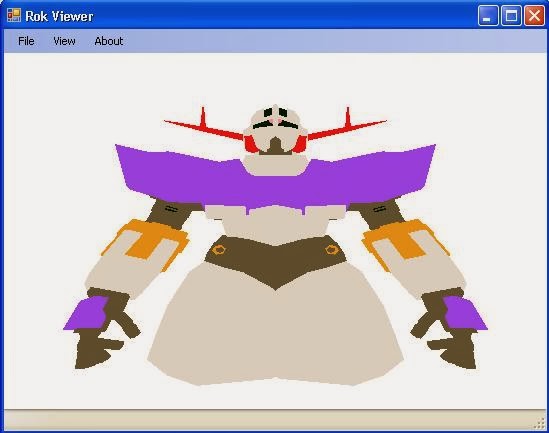
Rok Model Viewer


This application can display 3d models created by Hexagreat 3d modeller.
download from : http://www.flat2d.com/ for hexagreat3d


I created this application while I am learning openGl .
Application contain many bugs.And lacks many function.I will implement them when i learn more.

Note:
This application can only display model which contain faces

Download
https://app.box.com/s/2zbfok8no3b8ijjilcbx

The model is not my property. I just downloaded it form internet

Friday, December 6, 2013

Snake Game in c++ : Part 2

Snake Game in CPP : Part 1
Snake game in c++ : Part 2

Now contuning 2nd part of Snake game in c++. In previous code there was a problem that screen was flickring while running game.
This can be eliminated by drawing the things that are updated in loop. Like the snake, fruit and wall is constant it not needed to draw wall every loop.

First remove system("CLS"); from main method because clearing the screen drawing it takes time.

Now alter our draw method. From the previous code remove the drawwall()  method from draw() ,so wall will not be drawn again and again.

Now the thing how to make snake look  like it moving because screen is not cleared and drawn again. So snake become larger and larger.

To remove this problem we to further alter our draw method. Insted of using system("CLS"); to clear whole screen ,we can use space ‘  ‘ to make screen clear. Space can be put on place where we want to remove things.

Now to make snake appear moving we will just replace its last tail with blank space ‘ ‘. So as snake is moving its last position is been replaced with space.

Here is the draw method code

void snake::draw()
{
     /*
cur_cord.X=10;
cur_cord.Y=5;

SetConsoleCursorPosition(console_handle,cur_cord);
cout << "hi";  
*/


tail *tmp , *last;
tmp=start;
last = current;


while(tmp!=NULL)
                      {
                        cur_cord.X=tmp->x;
                        cur_cord.Y=tmp->y;
                        SetConsoleCursorPosition(console_handle,cur_cord);
                        //cout << "*" << cur_cord.X <<"-" <<  cur_cord.Y  ;
                        cout << "#";
                        tmp=tmp->next;                         
                      }
// remove tail
cur_cord.X=last->x;
cur_cord.Y=last->y;
SetConsoleCursorPosition(console_handle,cur_cord);
cout << ' ';
//draw the food
 cur_cord.X=foodx;
 cur_cord.Y=foody;
 SetConsoleCursorPosition(console_handle,cur_cord);
  cout << "?";
 
}

To draw wall just call drawWall() in main method.
Thus the game works fine now.

//------------------ hope enjoy it
The code used in this tutorial is little bit different from the code in the archive
use DEV C++ to compile the code.
Download the full code and study it

Download
https://app.box.com/s/jjfbfs94r8nukmdgynr7


Tuesday, August 27, 2013

Snake Game in C++ : Part 1

Snake Game in CPP : Part 1
Snake Game In cPP : Part 1
After creating the blog I decided to post a tutorial to create a snake game in c++ using only text mode.
This program I created as a project for my college
This tutorial is for beginners.
This is not Complete Game because it dont't contain any title screen or score


For those who don’t know this is the game where player control a snake , when snake eat food it grows in size and get points . Game ends when snake collide with wall or collide with itself.

Requirement
DEV C++ IDE http://www.bloodshed.net/or use any other you like
Basic knowledge of c++ .


Get Started
Before creating our game we have to think what we are going to make. That is the snake game in c++ using only text mode.

Now look at the structure of snake game.
There is a snake which player controls
There is obstacle wall.
There is food which make snake grow in length.

Design of game

Lets Program the game

Launch Dev C++ and create new c++ file. To keep it simple it will be a single file program.

First include the basic header file.

#include <iostream>
#include <windows.h>
#include <stdlib.h>
#include <conio.h>

using namespace std;

Now create a stucture to store our snake position this is double linklist I will explain it later.

typedef struct tailpos
{
int x;   // x cordinate of the snake
int y;  // y cordinate of the snake
struct tailpos *next;   // pointer to next node
struct tailpos *prev;   // pointer to previous node 
} tail;

// d used to set the direction
int d=4; // up = 1 , down = 2 , left =3 , right = 4;

A variable ‘d’ which will store direction .you can declare this variable inside class also.

The snake class

class snake
{
public:  
      
       int foodx,foody;             // position of the food
      
       HANDLE console_handle; // handle for the console      
       COORD cur_cord;        // COORD struct to keep the coordinate
      
       /*
       tail struct ==>
                      start = pointer to first part of body
                      current = pointer to last node
                      newtail = temp node for new tail
      
       */
      
       tail *start,*current,*newtail;
       snake();  // construct to initalise tail variable to null
       void insert(int x , int y); // insert the body of snake append to next node
       void draw();    // draw the snake
       void drawWall(); // draw the wall
       void move();    // control the movement
       bool collision();  //check snake collision with itself or wall
       void drawfood(int x=0); // draw food to new position if x==1     
     
};


Looking at the code you can understand what it will do

For storing snake position you can use 2d array. But i prefer linklist . For those who don’t know let me explain it.

 By using this data structure we can easily store and retrive snake parts position
For more information ... http://en.wikipedia.org/wiki/Linked_list


Now implement snake class methods:

  The constructor
   
snake::snake()
{
start = NULL; // start node point to null
current = NULL; // same
newtail = NULL;  // same 
console_handle=GetStdHandle( STD_OUTPUT_HANDLE );  // getting console handle

foodx=12;                    // starting food positions
foody=14;   
}

  The drawwall method this will draw boundary for our snake game

    void snake::drawWall()
{
     /*
     for drawing wall you can use variables to store wall starting and ending position
     */
     // draw left column
     cur_cord.X=0;
     for(int y=0;y<=30;y++)
           {
            cur_cord.Y=y;
            SetConsoleCursorPosition(console_handle,cur_cord);
            cout << '#';
           }
    // draw top row  
       cur_cord.Y=0;
       for(int x=0;x<=30;x++)
           {
            cur_cord.X=x;
            SetConsoleCursorPosition(console_handle,cur_cord);
            cout << '#';
           }
    // draw right column
     cur_cord.X=30;
     for(int y=0;y<=30;y++)
           {
            cur_cord.Y=y;
            SetConsoleCursorPosition(console_handle,cur_cord);
            cout << '#';
           }
          
     // draw bottom row
     cur_cord.Y=30;
       for(int x=0;x<=30;x++)
           {
            cur_cord.X=x;
            SetConsoleCursorPosition(console_handle,cur_cord);
            cout << '#';
           }   
       

}  


Draw the food for our snake

void snake::drawfood(int x)
{
tail *tmp;
tmp=start->next;
if(x==1) // draw new food
        {
                         foodx=rand()%20+7;  // rand number between 2 to 27
                         foody=rand()%20+7;

                        /*check if food not created on snake body
                         so we will loop through all snake node and check
                         if snake body pos meet with food position
                         if yes the generate new position else continue
                         */

                         while(tmp->next!=NULL)
                       {
                            if(foodx == tmp->x && foody == tmp->y)
                            {
                            drawfood(1);
                            }                                                
                                              
                            tmp=tmp->next;                
                       }                    
                                         
        }
}

Increasing snake length . when snake eat food its length should increase . For this
We have insert method
void snake :: insert(int x , int y)
{
     // check if start is null
     if(start == NULL)
     {
     newtail = new tail;
     newtail->x=x;
     newtail->y=y;
     newtail->next=NULL;
     newtail->prev=NULL;
     start=newtail;
     current=newtail;
     }
     else            // insert new node to start node
     {
     newtail = new tail;
     newtail->x=x;
     newtail->y=y;
     newtail->next=NULL;
     newtail->prev=current;  
     current->next=newtail;
     current=newtail;
     }
     
}

This method just append a new tailposition structure to the tailpos structure.

Here ‘start’ varaible points to node1 where as ‘current’ variable points to node3 i.e the last node.

After appending the new node.
After appending the new node the ‘current’ variable points to newely created last node i.e node4.

Now the best part how to move snake ? So the tails follow the head.
You know in game tails follow the head every where it goes.
So first Question how to move snake head?
Ans : Simple we have to print snake head at new cordinate at console every cycle.
         We can increment the current X,Y position of console. To move snake in specified direction.

Q: How to make tail follow the head ?
Ans : The tailpos structure which keep position of every part of snake. We just have to move value of head to its tail and value of first tail should move to next tail till last and increment position of head . In simple way remove value of last tail put previous tail value in it .

This way position of snake parts is shifted

The code to move:

void snake::move()
{
tail *tmp,*cur; // cur no use

tmp =current; // point tmp to last node
//cur =start->next;

while(tmp->prev!=NULL)
                      {
                      tmp->x=tmp->prev->x;        // copy val from revious to last
                      tmp->y=tmp->prev->y;
                      tmp=tmp->prev;              // set tmp to previous node
                     
                      }
/*
check for the value of d in order to change its direction
*/
if(d==1)
start->y--;

if(d==2)
start->y++; 

if(d==3)
start->x--;

if(d==4)
start->x++;                 
                     
}

The move method is called every cycle.

Collision Detection:

To check collision we can simpily compare snake head posiotion with
1)     Its tail
2)     Wall
3)     Food

Code to collision:
bool snake::collision()
{
                       tail *tmp;
                       tmp=start->next;
                       //check collision with itself
                       while(tmp->next!=NULL)
                       {
                            if(start->x == tmp->x && start->y == tmp->y)
                            return true;
                                                    
                                              
                            tmp=tmp->next;                
                       }
                       //check collision with food
                       if(start->x == foodx && start->y == foody)
                       {
                       insert(foodx,foody);          
                       drawfood(1);  // draw food at new position
                      
                       }
                       //check collision with wall
                         //collision top
                          for(int x=0;x<=30;x++)
                           {
                                  if(start->x == x && start->y == 0)
                                  {
                                         return true;                
                                  }
                            
                           }
                           //collision left
                          for(int y=0;y<=30;y++)
                           {
                                  if(start->x == 0 && start->y == y)
                                  {
                                         return true;                
                                  }
                            
                           }
                            //collision right
                          for(int y=0;y<=30;y++)
                           {
                                  if(start->x == 30 && start->y == y)
                                  {
                                         return true;                
                                  }
                            
                           }
                           //collision bottom
                          for(int x=0;x<=30;x++)
                           {
                                  if(start->x == x && start->y == 30)
                                  {
                                         return true;                
                                  }                            
                           }                         
                                                return false;
     }

Rendering the game:
void snake::draw()
{

drawWall(); // draw wall

tail *tmp;
tmp=start;

while(tmp!=NULL)
                      {
                        cur_cord.X=tmp->x;
                        cur_cord.Y=tmp->y;
                        SetConsoleCursorPosition(console_handle,cur_cord);
                        //cout << "*" << cur_cord.X <<"-" <<  cur_cord.Y  ;
                        cout << "#"; // print any value you want
                        tmp=tmp->next;                          
                      }
//draw the food
 cur_cord.X=foodx;
 cur_cord.Y=foody;
 SetConsoleCursorPosition(console_handle,cur_cord);
  cout << "?"; // print any value you want
 
}

This method prints wall , snake , food at the console.

The game loop:
The game loop which is repeated every time to draw snake,take input and process , and detect collision
int main()
{
snake ob;            // snake object
ob.insert(10,5); // insert snake body
ob.insert(10,4); // insert snake body
ob.insert(10,3);
ob.insert(10,2);

//ob.draw();
int dir=1; // initial direction
while(1) // main loop
{
ob.draw(); // draw food snake wall
Sleep(100); // wait after draw better to use a timer
system("CLS"); // clearthe screen
 

          if(ob.collision())// check for collision
          {
            cout << " you died ";
            break;               
            }

            if(kbhit())// check if keyboard key is pressed
            {
             switch(getch())
             {
             case 'w':d=1;
             break;
             case 's':d=2;
             break; 
             case 'a':d=3;
             break;
             case 'd':d=4;
             break;
             case 'm':ob.insert(10,7);
             break;                               
              
               }
             

               }
              
 ob.move();  // move the snake
}


// to wait for user input
getch();
return 0;   
}

I have used W,A,S,D key to control .
This is just the core of the game there is no welcome screen nor end screen . and there is score .
You can implement these your self.

The main problem in the game screen flicker every time. This problem can be elminated which I will discuss in Next Part. OR implement it your self thats easy.

I am sorry because The post is not formatted nor any synatx hilighter. I I am just getting started with blog.Maybe I will update it later

Here is the complete code copy and paste it